
How to Create a PTE Account — Step-by-Step with Screenshots
Creating your myPTE account takes about 5 minutes and is completely free. You only pay when you book a test. This guide walks through all three signup screens, email verification, and the profile completion step that most first-timers miss — plus what students under 18 need to do differently.
To create a PTE account, go to mypte.pearsonpte.com/users/profile/quick-registration and enter your email, a 12-character password and your country of residence. Verify your email with the 6-digit code sent to your inbox, then enter your given name(s), surname(s) and date of birth exactly as they appear on your passport. Finally, open Complete profile from your dashboard and fill in your address, phone number and citizenship details. The account is free — you only pay when you book a test.
What You Need Before You Start
Have these three things in front of you. Getting the name or date of birth wrong is the single most expensive mistake in the whole process, so it is worth opening your passport before you begin rather than typing from memory.
Your valid passport
Open to the photo page. You will copy your given name(s), surname(s) and date of birth from it character by character. A passport is the standard accepted ID for PTE in Nepal.
An email you can open now
A 6-digit verification code arrives within a minute and expires after 5 minutes. Use your own permanent email — not a consultancy's, not a friend's. Your scores live in this account for two years.
Your mobile number
Nepal's country code is +977. Enter the number without a leading zero. This is used for appointment reminders by SMS if you opt in.
How to Create a PTE Account in 5 Steps
Pearson splits registration across three numbered signup screens, then adds a separate profile completion step from your dashboard. Many students stop after step 3 and cannot understand why they are unable to book — the profile step is mandatory.
Open the myPTE registration page
Go straight to the registration page: mypte.pearsonpte.com/users/profile/quick-registration. That link opens screen 1 directly, so you can skip the login page entirely.
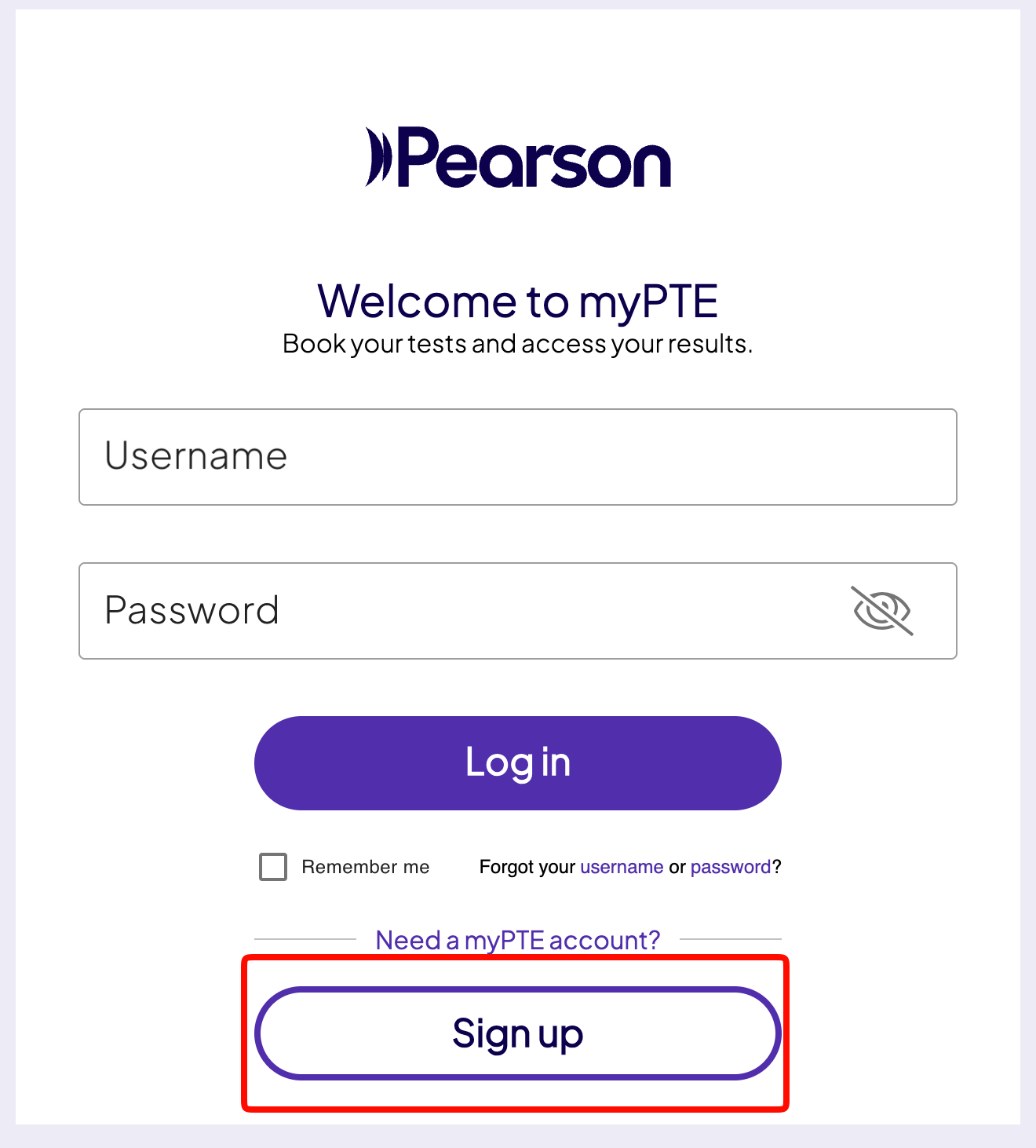
If you land on the myPTE login screen instead, click the outlined Sign up button under Need a myPTE account?. And if you already have an account, log in here — do not create a second one.
Enter your email, password and country of residence
This is screen 1 of 3. Your email doubles as your username, so pick one you will keep using. Choose Nepal as your country of residence if you currently live here — this determines which test centres and payment options you are shown.
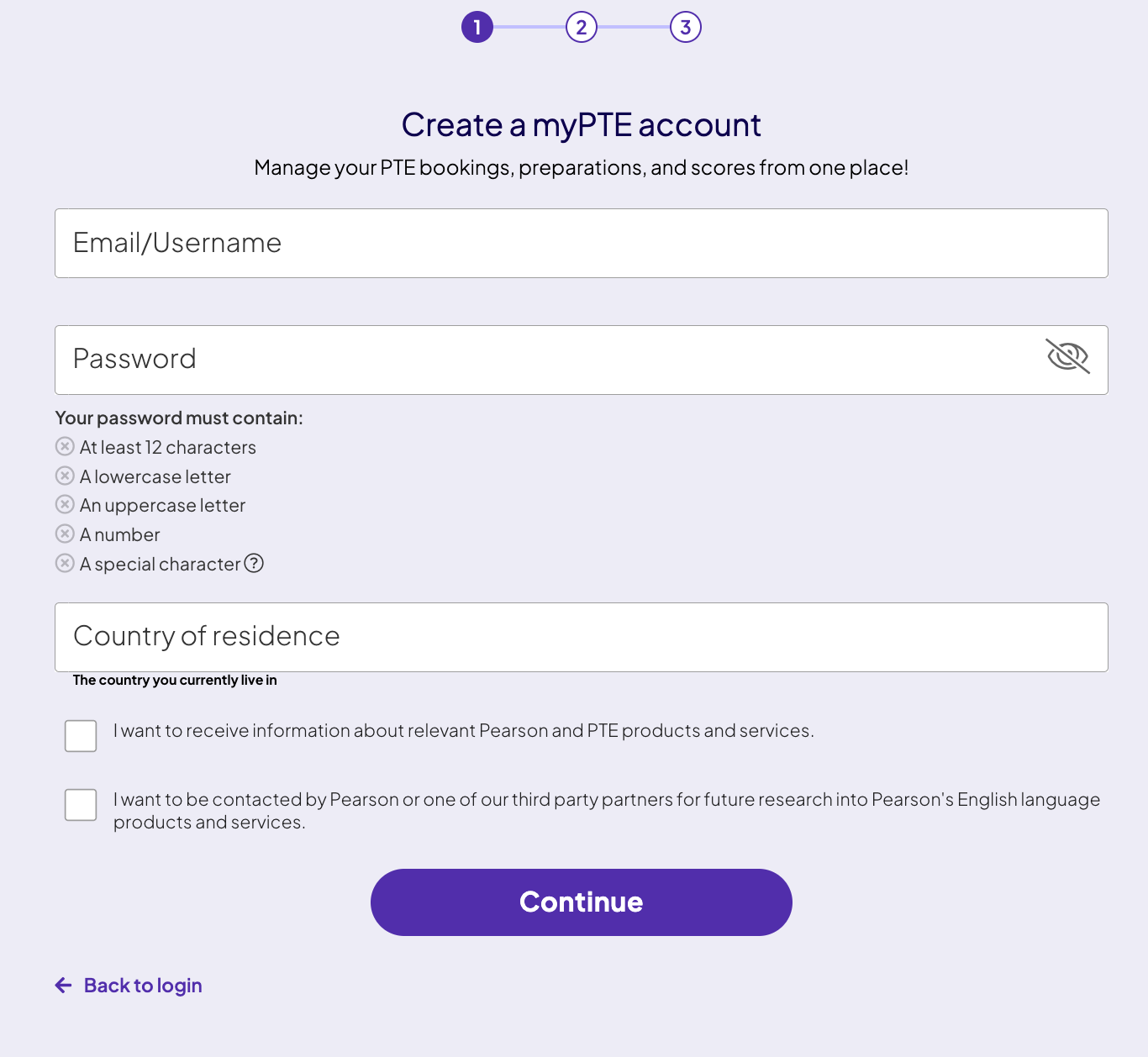
Your password must contain all five of these:
- At least 12 characters
- A lowercase letter
- An uppercase letter
- A number
- A special character — for example
!@#$
The two checkboxes at the bottom are marketing and research consents. Both are optional — leaving them unticked does not affect your ability to book or sit the exam.
Verify your email with the 6-digit code
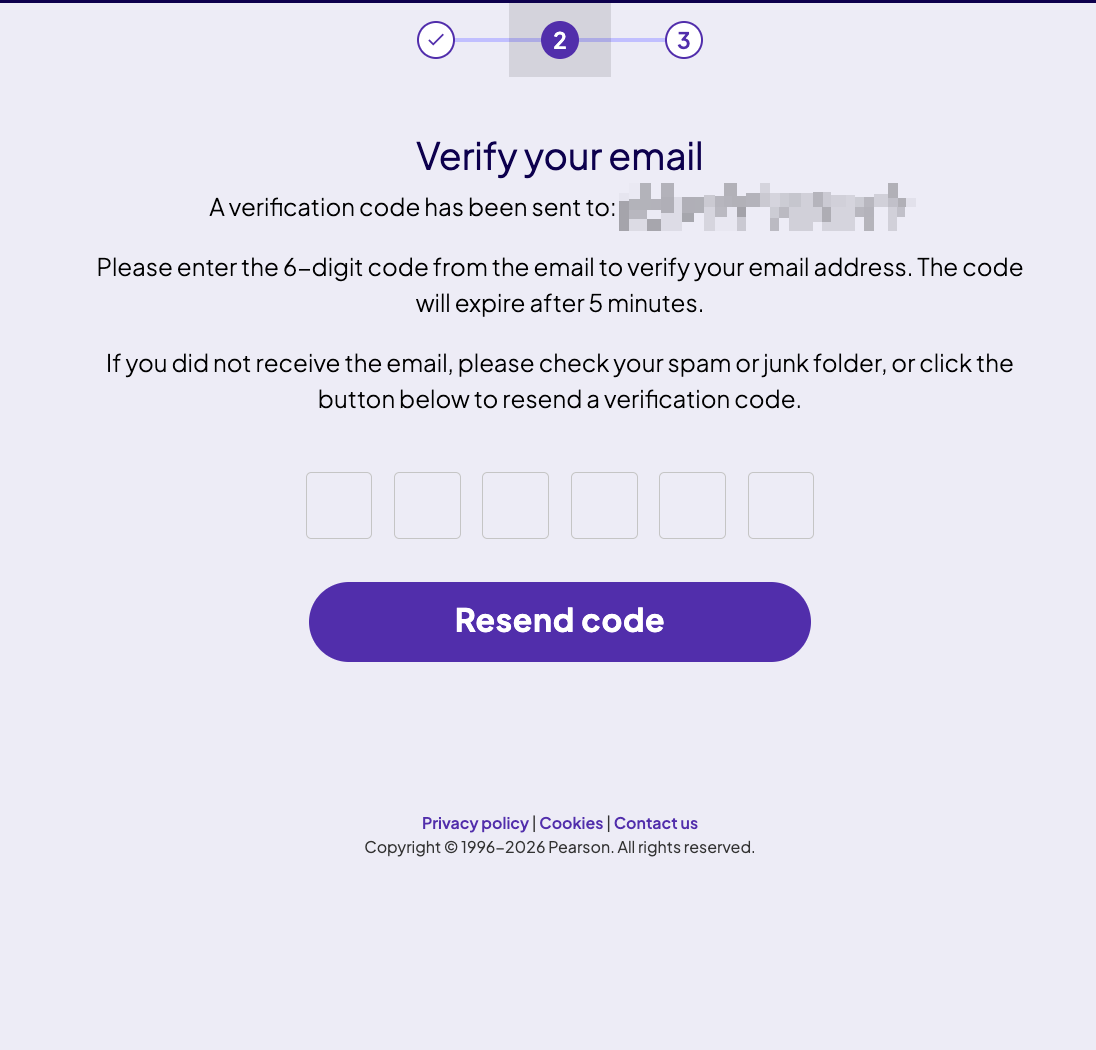
Screen 2 of 3. Pearson sends a 6-digit verification code to the email you just entered. Type it into the six boxes. The code expires after 5 minutes, so do this straight away.
Enter your name and date of birth exactly as printed on your passport
Screen 3 of 3. This is the step that decides whether your test day goes smoothly. Copy from the passport in front of you — not from memory, and not the way you normally write your name.
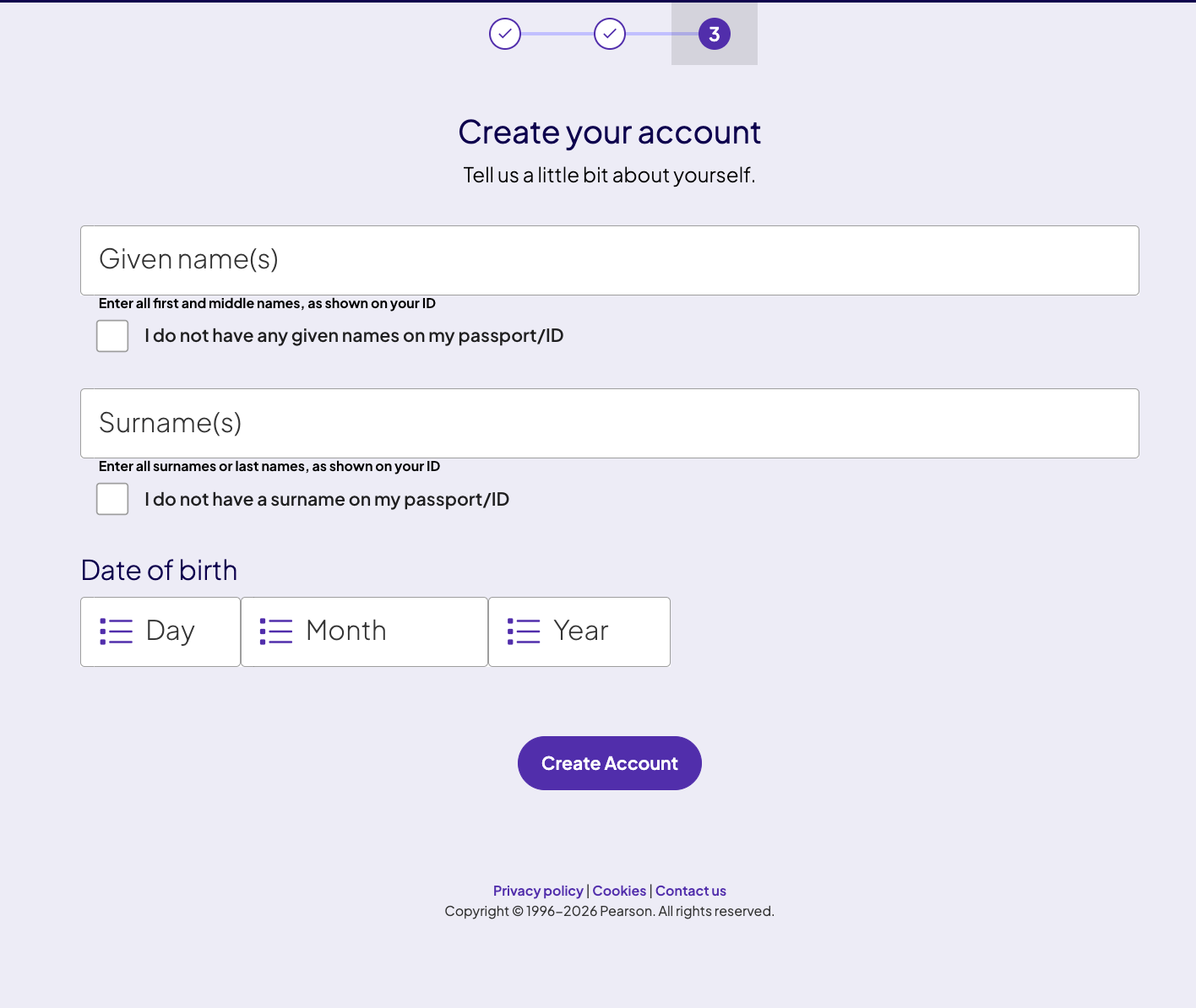
- Given name(s) — all of your first and middle names, exactly as shown on your passport.
- Surname(s) — your family name or last name, also known as surname(s).
- Date of birth — select day, month and year. Check the year twice; a mistyped year is a common and painful error.
If your passport genuinely has no given name or no surname printed on it — which does happen — tick the matching checkbox rather than inventing a value or repeating your other name.
Click Create Account. Your account now exists, but it is not yet ready to book.
Complete your profile from the dashboard
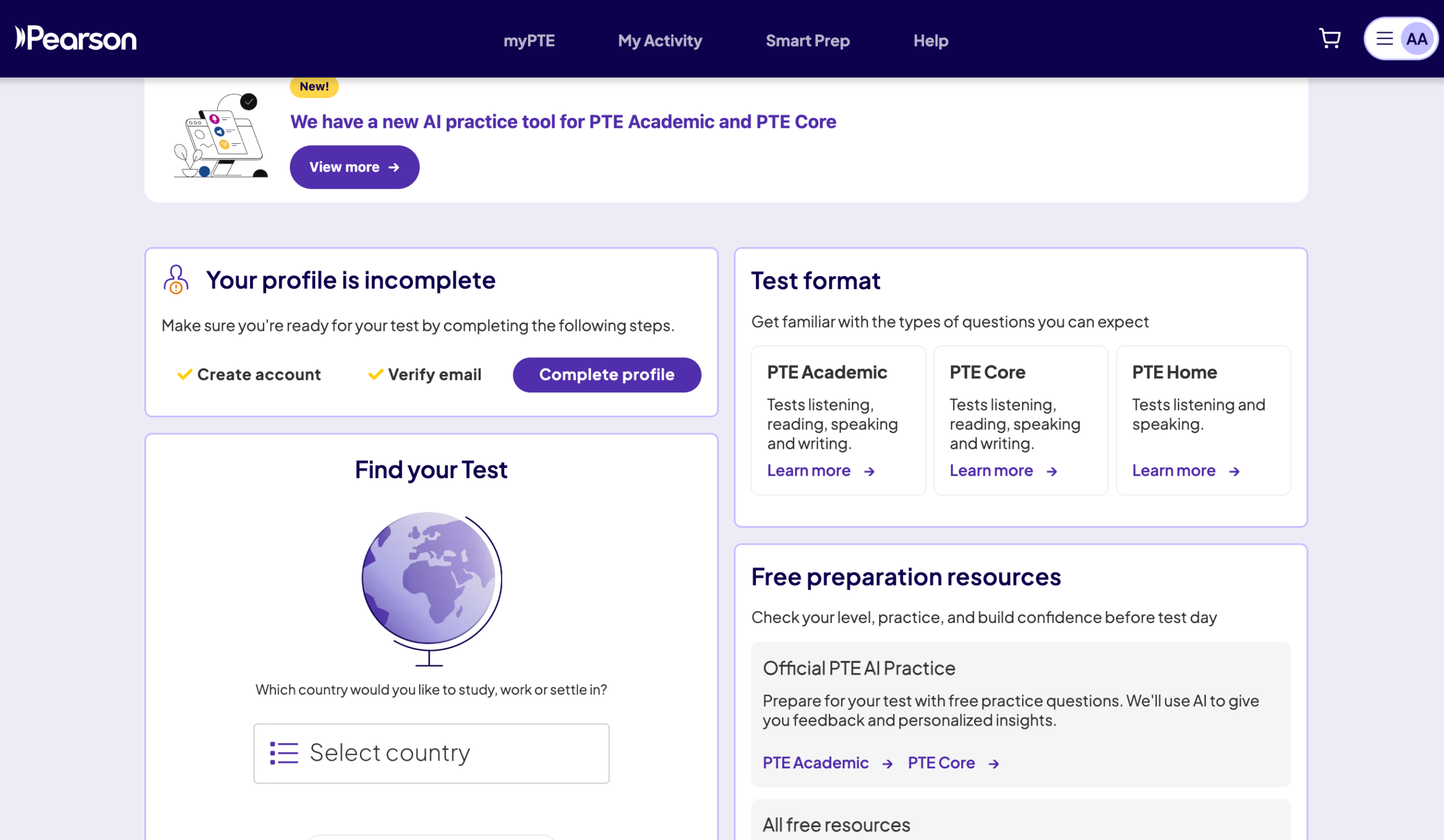
This is the step most people miss. After signing in you land on your myPTE dashboard, where a card reads “Your profile is incomplete”. Create account and Verify email already show ticks. Click Complete profile.
The profile form asks for the remaining details. Everything here should still match your passport:
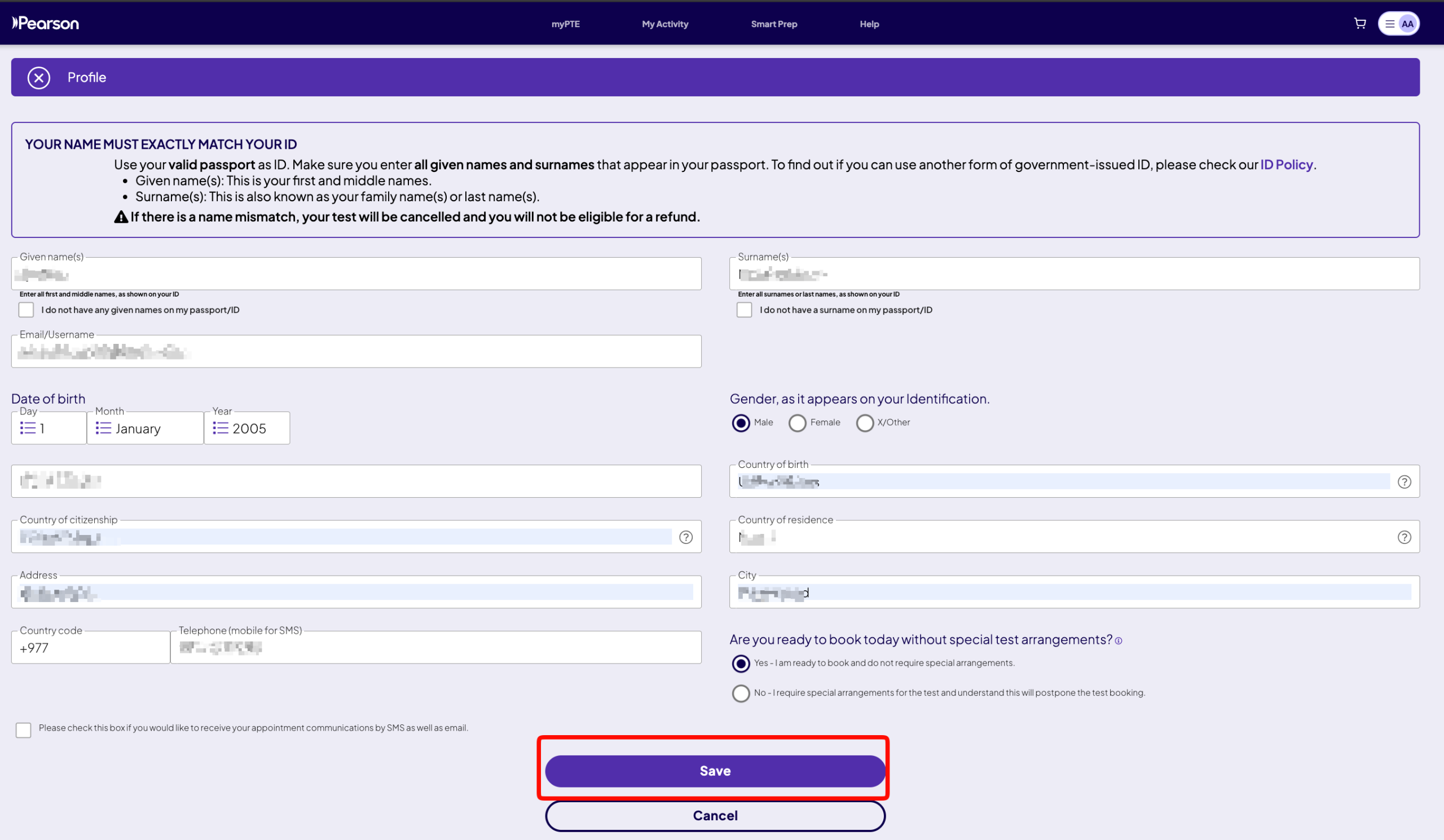
- Gender — as it appears on your identification.
- Country of birth, citizenship and residence — Nepal for most test takers here.
- Address and city — your current residential address.
- Country code and telephone — +977 for Nepal, then your mobile number without the leading zero.
- Special test arrangements — choose Yes, I am ready to book unless you need accommodations for a disability or medical condition. Selecting No deliberately postpones booking while Pearson reviews your request.
Optionally tick the SMS box to get appointment reminders by text as well as email. Then press Save. Your account is now complete and you can book a test.
Let PTE Nepal book your test at the best price
Once your profile is complete, send us your preferred date, centre and shift on WhatsApp. We check live availability, confirm what is open, and complete the booking for you — usually within 5 minutes during business hours.
- Best price in Nepal for the same official Pearson test
- Availability checked and confirmed before you pay
- Same official test centres, same test, same score report
- 17,500+ bookings completed over 7+ years
Message us for today's exact price and open dates before you pay.
Why Your Name Must Exactly Match Your Passport
Pearson states this plainly on the profile screen: if there is a name mismatch, your test will be cancelled and you will not be eligible for a refund. At USD 248.60, that is an expensive typing error — and it is the most common reason Nepali students lose their exam fee.
A mismatch is not a warning — it is a cancellation
Test centre staff compare your passport against the name on your booking. If they do not match, you are turned away at the door on test day. There is no refund and no free rebooking.
How Nepali names commonly go wrong
| Situation | Wrong entry | Correct entry |
|---|---|---|
| Passport reads Given: SITA KUMARI / Surname: SHRESTHA | Given: Sita Surname: Shrestha | Given: Sita Kumari Surname: Shrestha |
| Middle name dropped from habit | Given: Ram Surname: Thapa | Given: Ram Bahadur Surname: Thapa |
| Name order swapped | Given: Gurung Surname: Anish | Given: Anish Surname: Gurung |
| Spelling “corrected” by the student | Given: Sujan (passport says SUJAAN) | Given: Sujaan — match the passport, even if you dislike the spelling |
Students Under 18 Can Sit PTE — With Parental Consent
You do not have to wait until you turn 18 to take the PTE. School leavers applying abroad straight after +2 can register and sit the exam, provided they meet the age floor and their parent or guardian gives consent.
Can take PTE Academic
You may register and sit the exam with a valid passport, but a parent or legal guardian must give consent before you can test. Once approved, that consent stays valid for all your tests until you turn 18.
Not eligible for PTE Academic
The minimum age for PTE Academic is 16. Parental consent does not override this. If you are 15 or younger you will need to wait, regardless of your English level or passport status.
No consent needed
Register, complete your profile and book normally. Nothing extra is required beyond a valid passport.
How to give parental consent
Consent is handled inside the booking flow, not as a separate paper process you have to chase. After creating the account, the option appears in your myPTE dashboard and you can choose the method that suits your family:
7 Registration Mistakes That Cost Students Money
We have handled over 17,500 bookings. These are the errors we see repeatedly — every one of them is avoidable in the two minutes before you press Save.
Using a consultancy's email instead of your own
Your scores stay in this account for two years and universities may ask you to send them directly. If the account is tied to an agency email, you lose control of your own results. Always register with your personal email.
Dropping the middle name
If your passport shows a middle name in the given-name field, it belongs in Given name(s). Leaving it out is a mismatch, even though it feels like a small thing.
Stopping after “Create Account”
The account exists but cannot book. You must return to the dashboard and finish Complete profile. Students often assume the site is broken when the real problem is an unfinished profile.
Letting the verification code expire
Five minutes is short. Open your email tab before you start, and check spam immediately rather than waiting.
Creating a second account after forgetting a password
Use password recovery instead. Duplicate accounts registered against the same passport details cause verification problems and can delay your booking.
Selecting “No” on special test arrangements by accident
That option deliberately postpones your booking while Pearson reviews an accommodation request. Only choose it if you genuinely need adjustments for a disability or medical condition.
Paying someone to create the account
Registration is free and takes five minutes. Nobody should charge you for this step. Paying for a booking with a discounted voucher is a different matter — the account itself costs nothing.
Your Account Is Ready — What Now?
With a completed profile you can book a test, take free official practice, and view scores. Here is what to do in what order.
Stuck on any step?
Send us a screenshot of where you are stuck and we will tell you exactly what to fix. We have walked thousands of students through this screen by screen — there is no charge for asking.
Frequently Asked Questions About Creating a PTE Account
What is the PTE registration link?
The direct PTE registration link is mypte.pearsonpte.com/users/profile/quick-registration. This opens Pearson's account creation form straight away, so you do not have to go through the login page first. It is the official Pearson domain — always check the address bar before entering your password, and never register through a link sent by an unknown agent.
Is creating a PTE account free?
Yes. Creating a myPTE account costs nothing. You only pay when you book an exam, and the official fee is USD 248.60 (VAT included). Nobody should charge you a fee simply to register — if someone asks for payment to create your account, that is not an official cost.
How long does it take to create a PTE account?
About 5 minutes if you have your passport and email open. The three signup screens take two to three minutes, email verification is almost instant, and the profile completion form takes another two minutes.
Can I create a PTE account without a passport?
You can open the account, but you cannot sit the exam without valid ID. A passport is the standard accepted identification for PTE in Nepal, and the name in your account must match it exactly. Apply for your passport before booking a test date — do not book first and hope it arrives in time.
Can a student under 18 create a PTE account and take the exam?
Yes, if they are 16 or 17. They need a valid passport, and a parent or legal guardian must provide consent before the test. Consent can be given from the dashboard by entering the parent's email or phone number, or by uploading a signed consent form. Once approved it remains valid until the student turns 18. Students under 16 are not eligible for PTE Academic.
What is the minimum age for PTE Academic?
16 years old. Test takers aged 16 and 17 additionally need parental or guardian consent before they can sit the exam. There is no upper age limit.
I did not receive my 6-digit verification code. What should I do?
Check your spam or junk folder first, and in Gmail also look under Promotions — this is where it usually is. The code expires after 5 minutes. If it is genuinely missing, click Resend code on the verification screen and use only the newest code, as previous ones stop working immediately.
What does “Your profile is incomplete” mean on my dashboard?
It means you finished the three signup screens but have not yet filled in the full profile form. Click Complete profile and enter your gender, country of birth, citizenship, residence, address, city and phone number. You cannot book a test until this is saved.
What happens if my name does not match my passport?
Your test will be cancelled and you will not receive a refund. Test centre staff check your passport against the booking name on test day, and a mismatch means you are turned away. Correct any error in your profile before booking, since changes after booking must go through Pearson support and may not be possible close to your test date.
Should I enter my given name or surname first?
They are separate fields, so order is not the issue — placement is. Given name(s) takes all your first and middle names. Surname(s) takes your family or last name. Copy each from the matching field in your passport rather than from how you usually write your name.
Do I need to tick the marketing checkboxes to register?
No. Both checkboxes on the first signup screen are optional marketing and research consents. Leaving them unticked has no effect on your registration, booking or exam.
Can I change my email address after creating the account?
Your email doubles as your username, so changing it is not straightforward and may require contacting Pearson support. This is why it is worth using a permanent personal email from the start rather than a temporary or shared one.
Which test should I book — PTE Academic, PTE Core or PTE Home?
PTE Academic for university admission and most student visas — this is what the majority of Nepali students need. PTE Core for Canadian economic immigration. PTE Home for UK visas and settlement. Booking the wrong test type is not refundable, so confirm the requirement with your university or visa consultant first.
How do I book my PTE test at the lowest price in Nepal?
The official Pearson fee is USD 248.60 (VAT included). Booking through PTE Nepal costs less than the official rate — the best price in Nepal for the same test, at the same official centre, with the same score report. Message us on WhatsApp with your preferred date, centre and shift once your account is ready; we confirm live availability, quote you the exact figure for that day, and complete the booking, usually within 5 minutes during business hours. Always ask for the price on the day you book, because the rupee amount moves with the exchange rate.
Last updated: September 2026 · Information verified: September 2026

