
PTE Matching Account Solution: Resolving the Challenges
In the dynamic world of online assessments, PTE (Pearson Test of English) has become a widely recognized platform for testing English proficiency. However, users may encounter challenges related to double accounts or matching account issues, leading to temporary locks on their accounts. This article aims to shed light on the common scenarios faced by test-takers and provides a comprehensive solution to the PTE double account/matching account predicament.
Understanding the Matching Account Issues
Scenario 1: Same Details and Different Email
When a user uses identical personal details to create multiple PTE accounts but with different email addresses, the system prompts the user with an “Action Required” message.


Scenario 2: Same Email and Date of Birth
If a user inadvertently creates different PTE accounts using the same email address and date of birth but with distinct details, a matching account issue arises. Pearson’s security protocols detect this situation and temporarily lock the account for safety reasons. I

The Solution: Merging Your Profiles
For individuals encountering either of these scenarios, Pearson provides a solution through a profile merging process. Users are required to fill out a form to initiate the merging procedure. It’s important to note that possessing the old PTE ID (starting with PTE00) is sufficient for this process, and there is no need for the old username and password.
PS: You can search for old PTE ID in you mail inbox.
The Form: Providing the Necessary Information
The merging form comprises several sections to collect essential information for the merging process. Users are asked to provide details such as:
- Test Type (PTE Academic, PTE Academic UKVI, PTE Home)
- Test Taker’s Details (First and Last Name, Email, Date of Birth, PTE ID, Other PTE IDs)
- Contact Information (Telephone number, Country/Region, Address)
- Additional Comments
- Upload of a valid Government-issued Photo ID (usually a passport)
Click below to get the online form for the merger process.
Form filling process
Firstly, you need to select your test type and click on I am not a robot box to proceed.
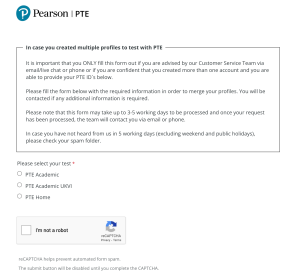
After this, the full form will be opened in the same page, where you need to input all the details.

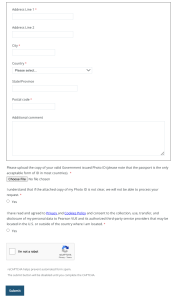
Once the form is submitted, users are informed that the process may take 3-5 working days. After the request is processed, the Pearson team contacts the user via email or phone. If there is no response within 5 working days (excluding weekends and public holidays), users are advised to check their spam folder.
Encountering double account or matching account issues with PTE can be a stressful experience, but Pearson provides a structured solution through the profile merging process. By following the outlined steps and providing accurate information through the form, users can expect a resolution to their account issues within a reasonable timeframe. The key lies in understanding the specific scenarios and taking proactive steps to address them, ensuring a smooth and secure testing experience with PTE.
Frequently asked questions related to Double account issue
- Why is my PTE account temporarily locked, and what does “Matching Account” mean?
Your account is temporarily locked because the system detected another account that might belong to you. This is known as a “Matching Account” issue, where the system found similarities in the information used to create different accounts, and for security reasons, your account is temporarily locked.
- How did I end up with a matching account issue?
If you used the same email and date of birth for different PTE accounts, the system identifies this as a matching account issue. It’s important to use unique details for each account to avoid such problems.
- What happens to my test results and data during the temporary lock period?
Your test results and data are secure during the temporary lock. The system temporarily restricts access to your account for security reasons, but your information is safe.
- How can I confirm if I have a matching account issue or a double account?
If you receive a message about a “Matching Account,” it means the system detected similarities in your account information. Double accounts refer to having more than one PTE account. The resolution process is similar for both situations.
- What is the process for resolving a matching account issue?
To resolve a matching account issue, you need to fill out a merging form provided by Pearson. This form collects essential details to help merge your profiles and resolve the issue. Follow the instructions in the form carefully.
- Why do I need to fill out a form for merging profiles, and what information is required?
The form is essential to gather the necessary details for merging your profiles accurately. You’ll need to provide information like your test type, name, email, date of birth, PTE ID, contact details, and upload a clear copy of your government-issued Photo ID.
- Is having the old PTE ID (starting with PTE00) sufficient for the merging process?
Yes, having the old PTE ID (starting with PTE00) is enough. You don’t need to remember the old username and password. This simplifies the process of merging your profiles.
- How long does it take to process the merging request, and what happens afterward?
The merging request typically takes 3-5 working days to process. Once processed, the Pearson team will contact you via email or phone. If you don’t hear back within 5 working days, check your spam folder.
- What if I don’t hear back from Pearson within the specified timeframe?
If you haven’t heard back within 5 working days (excluding weekends and holidays), check your spam folder. If there’s still no response, you may want to contact Pearson support for further assistance.
- Can I still take the PTE test while my account is temporarily locked?
While your account is temporarily locked, scheduling or taking a PTE test may be restricted. It’s advisable to wait until the account issue is resolved before attempting to schedule a new test.
- Can I expedite the processing of my merging request if I have urgent test dates approaching?
Unfortunately, the merging process follows a standard timeline. However, you can inform Pearson support about your urgent situation. They will do their best to assist you within the standard processing time.
- What happens if I provide incorrect information in the merging form?
Providing accurate information is crucial. If there are mistakes, it could delay the resolution process. Double-check the details before submitting the form to ensure a smooth process.
- Are there any specific tips to ensure my government-issued Photo ID is clear and meets the requirements?
Ensure your uploaded Photo ID is clear and follows the guidelines provided in the form. This ensures that Pearson can process your request without any issues.
- Can I contact Pearson directly for updates on my merging request?
Yes, you can contact Pearson support for updates. However, they will likely provide information through the email or phone contact details you provided in the merging form.
- Is there any way to prevent matching account issues in the future?
To prevent matching account issues, make sure to use unique details for each PTE account. Use different email addresses and avoid duplicating information to ensure a smooth testing experience in the future.

